📌 This article is for:
- 🔧 QA Engineers → Who want to automate broken link detection and reduce manual testing effort
- 🔍 SEO Specialists → Who want to prevent SEO score drops caused by broken links
- ⚙️ Test Automation Engineers → Who want to build production-level tools with Selenium and Python
🔥 What you’ll get from this article
- Automatically detect broken links that hurt your SEO
- Eliminate manual link checking entirely
- Implement checks covering all 4xx/5xx status codes, not just 404
- Get production-ready code usable for QA, test automation, and SEO
One of the most overlooked issues in web operations is broken links (404 errors). Manual checking takes forever, but leaving them unfixed hurts both your SEO rankings and user trust — that’s the problem this QA automation tool, LinkChecker, was built to solve.
This article provides a deep-dive into the Selenium × Python link checker, covering design decisions, method roles, and common pitfalls. Execution result samples and CSV output examples are included so you can start using it right away.
- 00. How Broken Links Affect Your SEO
- 01. Execution Results Sample (See It In Action)
- 02. Why Selenium + requests?
- 03. Supported Error Status Codes
- 04. Setup and Required Libraries
- 05. Class Structure and Design
- 06. __init__ and Initial Setup
- 07. get_all_links — Link Collection Strategy
- 08. check_link_status — Two-Stage Status Check
- 09. take_screenshot — Evidence Collection
- 10. handle_cookie_popup — GDPR Handling
- 11. save_results — CSV Report Output
- 12. Common Errors and Fixes
- 13. High-Volume URL Processing
- 14. Ideas for Further Improvement
- 15. Pitfalls & Lessons Learned
- 16. Summary
00. How Broken Links Affect Your SEO
It’s easy to think broken links only frustrate users — but the SEO impact is serious too. Broken links damage your site’s quality, search rankings, and user experience all at once.
When Googlebot hits broken links, it wastes crawl budget — making it harder for other pages to get indexed
Sites with many 404 pages may be flagged as low-quality by Google, hurting overall search rankings
Users who hit broken links leave immediately. Rising bounce rates indirectly harm SEO performance too
01. Execution Results Sample (See It In Action)
When you run the tool, URL, status code, and result are displayed in a clear list — making broken links instantly visible.
| URL | Status | Result |
|---|---|---|
| /top | 200 | ✅ OK |
| /about | 200 | ✅ OK |
| /careers | 404 | ❌ Not Found |
| /old-page | 410 | ❌ Gone |
| /contact | 200 | ✅ OK |
The terminal also outputs results in real-time in the same format.
=== Execution Results ===
[Checking] /top       → 200 OK
[Checking] /about     → 200 OK
[Checking] /careers   → 404 Not Found  ← Broken link detected!
[Checking] /old-page  → 410 Gone       ← Deleted page detected!

=== Summary ===
Total links: 89  /  Error links: 3
📸 Screenshots saved
📊 CSV exported → Desktop/LinkChecker/
Here’s what the actual terminal output looks like when run in the author’s environment. Out of 128 total links, 2 broken links were detected — and the CSV and screenshots were saved automatically.
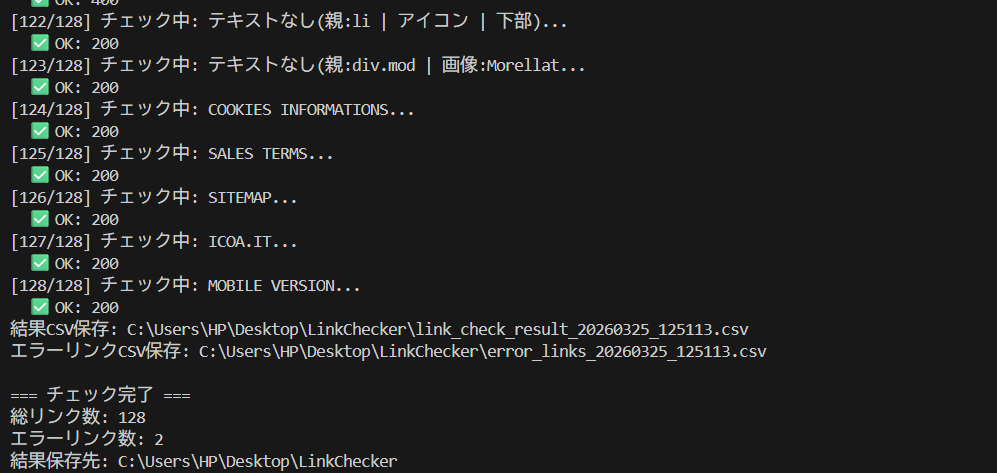
▲ Real terminal output: 128 links checked, 2 errors detected. CSV and screenshots saved automatically
When an error is detected, a screenshot of the error page is automatically saved like this:
▲ Screenshot automatically saved when a 404 error is detected
Auto-Generated CSV Report (Save and Reuse)
In real-world projects, recording results is essential. This tool auto-generates a CSV after every check — ready to attach to bug tickets, share with SEO teams, or prioritize fixes.
Link Text,URL,Status Code,Screenshot Path,Check Time
Top Page,/top,200,,2026-03-19 14:30:01
About,/about,200,,2026-03-19 14:30:03
Careers,/careers,404,screenshots/404_careers.png,2026-03-19 14:30:22
Old Page,/old-page,410,screenshots/410_old-page.png,2026-03-19 14:30:24
Contact,/contact,200,,2026-03-19 14:30:25
Here’s what the auto-generated CSV looks like when opened in Excel. Link text, URL, status code, and screenshot path are all organized in one view — ready to attach directly to a bug ticket.

▲ Auto-generated CSV opened in Excel. Link text, URL, status code, and screenshot path all organized in one view
All link check results in one file. Great for analysis and reporting
Errors extracted into a separate file. Start fixing immediately
02. Why Selenium + requests?
You might wonder: “Can’t we just use Selenium alone?” The problem is that Selenium can’t directly retrieve HTTP status codes.
💡 The production-correct approach
Selenium handles link extraction and DOM operations. requests handles HTTP status verification. This division of responsibility is the standard in real-world QA work.
| Tool | Strengths | Weaknesses |
|---|---|---|
| Selenium | DOM manipulation, JS execution, Cookie handling, page rendering | Cannot directly retrieve HTTP status codes |
| requests | Fast and lightweight HTTP status checking | Cannot handle JS auth, Cookies, or dynamic content |
03. Supported Error Status Codes
“Broken links = 404” is a common misconception. In real-world QA, all 4xx/5xx codes should be targeted. Here’s what this tool detects:
| Status | Meaning | Action |
|---|---|---|
| 404 | Page not found (classic broken link) | ✅ Detected + Screenshot |
| 410 | Page permanently deleted | ✅ Detected + Screenshot |
| 500 | Internal server error | ✅ Detected + Screenshot |
| 502/503/504 | Gateway / service unavailable | ✅ Detected + Screenshot |
| 403 | Access restricted (page exists) | ⏭️ Skipped (treated as normal) |
| 200/301/302 | OK / Redirect | ✅ Normal |
04. Setup and Required Libraries
# Install required libraries
pip install selenium requestsCross-platform — runs on both Windows and Mac
Auto-detects ChromeDriver. No manual driver management needed
Fast and lightweight HTTP status checking. Handles large volumes efficiently
05. Class Structure and Design
# Usage is just 3 lines
checker = LinkChecker("https://example.com")
results = checker.run_check()
checker.close()
class LinkChecker:
__init__ # Init, output dir, WebDriver, error list
│
├── setup_output_directory # Create folders
├── setup_driver # Chrome options + driver launch
│
├── run_check # ★ Main loop (overall control)
│ ├── get_all_links # Collect links with Selenium
│ ├── check_link_status # HTTP status check
│ └── take_screenshot # Error page screenshot
│
├── save_results # Save CSV
└── close # Quit WebDriver06. __init__ and Initial Setup
Constructor
def __init__(self, base_url, output_dir=None):
    if output_dir is None:
        desktop_path = os.path.join(os.path.expanduser("~"), "Desktop")
        output_dir = os.path.join(desktop_path, "LinkChecker")

    self.base_url = base_url
    self.output_dir = output_dir
    self.setup_output_directory()   # Create folder
    self.setup_driver()             # Launch Chrome
    self.error_links = []           # Accumulate error links
setup_driver — Chrome Options
| Category | Option Example | Purpose |
|---|---|---|
| Bot Detection Bypass | --disable-blink-features=AutomationControlled | Prevent sites from detecting automation |
| Suppress Logs | --log-level=3 / --silent | Show only tool’s own logs in terminal |
| UA Spoofing | Set Windows Chrome UserAgent | Avoid crawler blocking |
| Hide WebDriver | Override navigator.webdriver to undefined | Disable JS-level bot detection |
07. get_all_links — Link Collection Strategy
- Page Access & Initial Wait —
time.sleep(2)to wait for dynamic content to load - Cookie Popup Handling —
handle_cookie_popup()auto-clicks GDPR consent dialogs - Collect All a Tags —
find_elements(By.TAG_NAME, "a")filtered to HTTP URLs only - Pre-save Element Info (Stale Element Prevention) — Save location/size/XPath to a dict
- Fill in Missing Link Text — Fallback order:
title → alt → aria-label
Stale Element Prevention
# ❌ Bad: DOM change causes StaleElementReferenceException
elements = driver.find_elements(By.TAG_NAME, "a")
do_something()
elements[0].click()  # ← Exception here!

# ✅ Good: Pre-copy all needed info into a dict
element_data = {
    'location': element.location,
    'classes':  element.get_attribute("class") or "",
    'id':       element.get_attribute("id") or "",
    'xpath':    self.get_element_xpath(element)
}
08. check_link_status — Two-Stage Status Check
| Method | Advantages | Disadvantages |
|---|---|---|
requests.head() | Fast and lightweight — no body download | Some servers reject HEAD requests |
requests.get() | Supported by virtually all servers | Slower due to body download |
check_with_selenium() | Accurate for JS auth and redirects | Slowest of the three |
# First: lightweight HEAD check
response = requests.head(url, timeout=8, allow_redirects=True, headers=headers)
status_code = response.status_code

# 400s (except 403/404): re-check with GET
if 400 <= status_code < 500 and status_code not in [403, 404]:
    response = requests.get(url, timeout=8, allow_redirects=True, headers=headers)
return response.status_code09. take_screenshot — Evidence Collection
Captures the 404/500 error page. Saved as 404_text_timestamp.png
Returns to origin page, injects JS red highlight + "ERROR LINK" banner, then captures
# Apply red border + glow effect to the broken link element
element.style.cssText += `
    border: 3px solid #ff0000 !important;
    box-shadow: 0 0 15px rgba(255, 0, 0, 0.8) !important;
    z-index: 999999 !important;
`;

# Add fixed error banner at top of page
var label = document.createElement('div');
label.innerHTML = 'ERROR LINK: ' + linkText.substring(0, 30);
label.style.cssText = `
    position: fixed; top: 20px; left: 50%;
    background: #ff0000; color: white; padding: 10px 20px;
`;
Here's what the actual BEFORE screenshot looks like. The broken link is highlighted with a red border, and an "ERROR LINK" banner is injected at the top — making it immediately clear which link caused the problem.
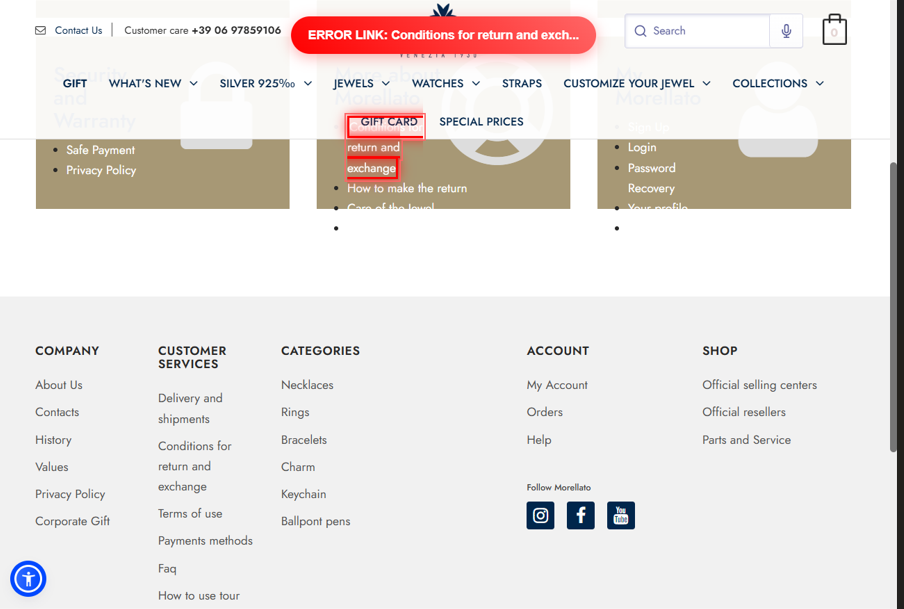
▲ Broken link highlighted with red border + "ERROR LINK" banner injected via JS. Pinpoints exactly which link caused the issue
10. handle_cookie_popup — GDPR Handling
cookie_selectors = [
    "//button[contains(text(), 'Accept all cookies')]",
    "//button[contains(text(), 'Accept')]",
    "//button[contains(text(), 'Accetta')]",
    "//button[contains(@class, 'accept')]",
]
self.driver.execute_script("arguments[0].click();", button)
11. save_results — CSV Report Output
| File | Content | Use Case |
|---|---|---|
link_check_result_*.csv | All link check results | Overview and statistics |
error_links_*.csv | Error links only | Bug ticket attachment / fix work |
# utf-8-sig = BOM-encoded UTF-8 (prevents Excel garbling)
with open(csv_path, 'w', newline='', encoding='utf-8-sig') as csvfile:
    writer = csv.DictWriter(csvfile, fieldnames=results[0].keys())
    writer.writeheader()
    writer.writerows(results)

error_count = sum(1 for r in results if r['Status Code'] in [404, 410, 500, 502, 503])
print(f"✅ OK links   : {len(results) - error_count}")
print(f"❌ Error links: {error_count}")12. Common Errors and Fixes
① ChromeDriver Version Mismatch
pip install --upgrade selenium② TimeoutException — Page won't load
self.driver.set_page_load_timeout(30) # 15s → 30s③ Zero a tags found
time.sleep(5) # 2s → 5s and retry13. High-Volume URL Processing
① Parallel Processing with concurrent.futures
from concurrent.futures import ThreadPoolExecutor, as_completed

def check_links_parallel(links, max_workers=10):
    results = []
    with ThreadPoolExecutor(max_workers=max_workers) as executor:
        future_to_link = {
            executor.submit(check_link_status, link['url']): link
            for link in links
        }
        for future in as_completed(future_to_link):
            link = future_to_link[future]
            status = future.result()
            results.append({'url': link['url'], 'status': status})
    return results
② Timeout and Retry Handling
def check_with_retry(url, max_retries=3, timeout=8):
    for attempt in range(max_retries):
        try:
            response = requests.head(url, timeout=timeout, allow_redirects=True)
            return response.status_code
        except requests.exceptions.Timeout:
            if attempt < max_retries - 1:
                time.sleep(2)
return 014. Ideas for Further Improvement
concurrent.futures for parallel execution. Check 1,000 links at production speed
Recursively follow internal links to check the entire site in one run
Auto-retry on timeout to reduce false positives from temporary errors
Skip mailto:, tel:, and specific domains to eliminate unnecessary checks
15. Pitfalls & Lessons Learned
Here are the key issues I encountered during implementation. I hope this helps others who run into the same problems.
① Selenium Cannot Retrieve HTTP Status Codes Directly
I started writing the code assuming Selenium alone could handle broken link detection. However, while Selenium excels at DOM manipulation, it has no built-in way to directly retrieve HTTP status codes.
The solution was to combine it with the requests library.
# ❌ Selenium alone cannot retrieve HTTP status codes
# ✅ Solved by combining with requests
response = requests.head(url, timeout=8, allow_redirects=True)
status_code = response.status_code
💡 Key Takeaway: The right approach is to use Selenium for link extraction and DOM operations, and requests for status code verification.
② StaleElementReferenceException Occurs
After retrieving elements, if the DOM gets updated, the previously obtained element references become invalid, causing a StaleElementReferenceException. At first, I had no idea why this error was happening.
The solution was to save element information into a dict in advance.
# ❌ Bad example: trying to interact with elements later causes an error
elements = driver.find_elements(By.TAG_NAME, "a")
do_something()
elements[0].click()  # ← StaleElementReferenceException!

# ✅ Good example: save info to a dict immediately
element_data = {
    'href': element.get_attribute("href"),
    'text': element.text,
}
💡 Key Takeaway: Rather than reusing element references later, get into the habit of storing the necessary data into a dict right after retrieval for stable execution.
③ Zero <a> Tags Retrieved
Running find_elements(By.TAG_NAME, "a") returned 0 results. The cause was that the wait time was not long enough for JavaScript-rendered content to finish loading.
# ❌ May return 0 results
driver.get(url)
elements = driver.find_elements(By.TAG_NAME, "a")

# ✅ Solved by increasing wait time
driver.get(url)
time.sleep(5)  # Increased from 2s to 5s
elements = driver.find_elements(By.TAG_NAME, "a")
⚠️ Note: The appropriate value for time.sleep() depends on the site's loading speed. Heavy sites may require 10 seconds or more.
④ Some Servers Reject HEAD Requests
When attempting lightweight checks using requests.head(), some servers rejected the HEAD method and returned a 405 error.
The solution was to implement a two-step check: fall back to GET if HEAD fails.
# First, try a lightweight HEAD request
response = requests.head(url, timeout=8)

# If a 4xx is returned, re-check with GET
if 400 <= response.status_code < 500:
    response = requests.get(url, timeout=8)
💡 Key Takeaway: A HEAD → GET fallback structure prevents false positives caused by server-side differences.
⑤ ChromeDriver Version Mismatch
After updating Chrome, the script suddenly stopped working. The cause was a version mismatch between Chrome and ChromeDriver.
# ✅ Solved by upgrading to selenium 4.6+
pip install --upgrade selenium
💡 Key Takeaway: Selenium 4.6 and later automatically manages ChromeDriver, which permanently resolves this issue. Upgrading to the latest version is strongly recommended to eliminate manual version management.
16. Summary
After running the script, the screenshots folder contains both error page screenshots (404_) and pre-error screenshots (BEFORE_) saved as a pair. The filenames include link text and timestamps, making it easy to look back at results later.
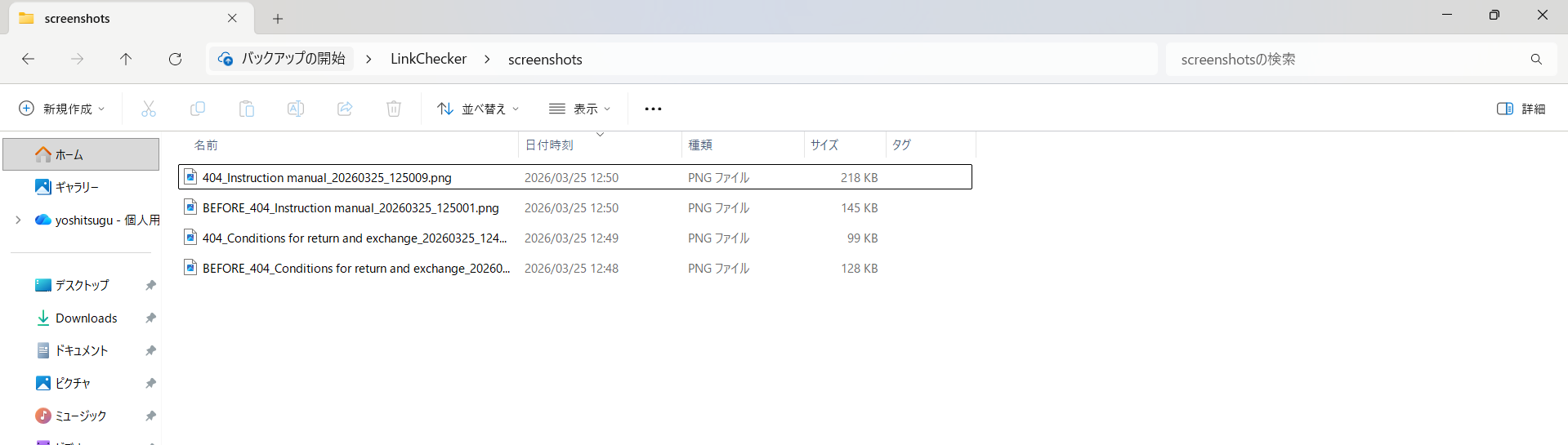
▲ Contents of the auto-saved screenshots folder. Error page screenshots (404_) and pre-error screenshots (BEFORE_) are saved as pairs
- Selenium for link extraction, requests for status verification — the correct division of responsibility in production QA
- Target all 4xx/5xx status codes, not just 404 — the production-standard approach
- Automatically generate before/after error screenshots as evidence
- Results are auto-exported to Excel-compatible CSV — attach directly to bug tickets
- Use for SEO improvement — regularly monitor and fix broken links before they hurt rankings
- Integrate into CI/CD — build a quality gate that automatically checks links before every release
- Combine with cron / task scheduler for weekly/monthly automated monitoring
3 Ways to Use This Tool
Broken links hurt Google rankings. Run weekly/monthly to keep your site healthy
Integrate pre-release link quality checks into your test suite with auto-generated evidence
Plug into GitHub Actions or Jenkins to auto-check links before every deployment
Combine with cron or Windows Task Scheduler for weekly/monthly auto-runs
🚀 Future Extension Ideas
- Full-Site Crawl → Recursively follow internal links to check the entire site
- Parallel Processing (concurrent.futures) → Process 1,000 URLs at high speed
- Scheduled Run + Slack Notifications → Auto-run via cron and send Slack alerts on errors